



Linux
This instruction assumes the following location of Passwork — /var/www/
Preparation
- Before updating, if Passwork is installed in a cloud/virtual environment, create a snapshot of the OS virtual state to restore functionality in case of incorrect update;
- Obtain root privileges:
- shell
sudo -i
Obtaining current version of Passwork
Create a temporary directory to download Passwork:
- shell
mkdir /tmp/update_passwork
If the Passwork server is located in a closed network
You need to go to the Passwork Customer portal, copy the certificate number and use the browser address bar to get version 7 of Passwork — https://portal.passwork.pro/api/download?apikey=certificate_number
Go to the Passwork Customer Portal and copy the API key to get the current version:
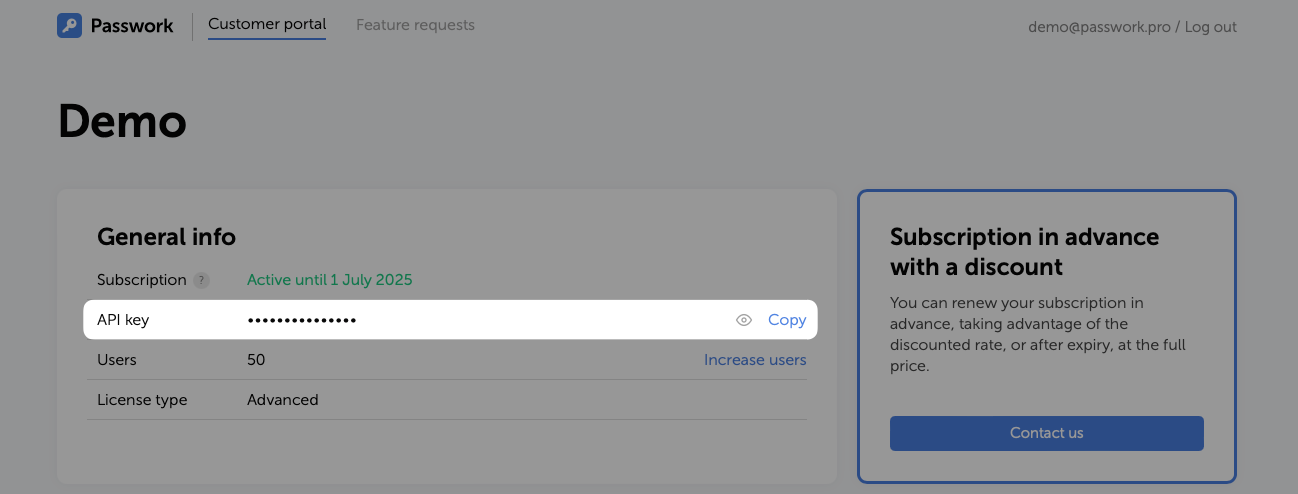
Create the API_KEY variable with the certificate number:
- shell
API_KEY=your_api_key
Download version 7 of Passwork using the request:
- shell
curl -o "/tmp/update_passwork/passwork.zip" "https://portal.passwork.pro/api/download?apikey=$API_KEY"
Clear the API_KEY variable with the certificate number:
- shell
unset API_KEY
Updating to actual version
Get the current Passwork version into a variable:
- shell
# Get Passwork version from the version file
version=$(cat /var/www/version)
Copy Passwork configuration files to the temporary directory:
- shell
cp /var/www/init/config.env /tmp/update_passwork/
cp /var/www/init/encryption_key /tmp/update_passwork/
cp /var/www/.env.local /tmp/update_passwork/
Create an archive of the current Passwork version to allow rollback to the previous version:
- shell
# Install zip if an error occurs during execution
apt install zip -y
dnf install zip -y

zip -r /var/passwork-$version.zip /var/www/*
Delete all contents from the Passwork directory:
- shell
rm -rf /var/www/* && rm -rf /var/www/.*
Unzip the updated Passwork version to the physical location:
- shell
unzip /tmp/update_passwork/passwork.zip -d /var/www/
Move the copied Passwork configuration files to the new version:
- shell
mv /tmp/update_passwork/config.env /var/www/init/
mv /tmp/update_passwork/encryption_key /var/www/init/
mv /tmp/update_passwork/.env.local /var/www/
Delete the temporary update_passwork directory:
- shell
rm -rf /tmp/update_passwork
Set permissions for the Passwork physical location:
- DEB
- RPM
find /var/www/ -type d -exec chmod 755 {} \;
find /var/www/ -type f -exec chmod 644 {} \;
find /var/www/init -type f -exec chmod 600 {} \;
chown -R www-data:www-data /var/www/
find /var/www/ -type d -exec chmod 755 {} \;
find /var/www/ -type f -exec chmod 644 {} \;
find /var/www/init -type f -exec chmod 600 {} \;
chown -R apache:apache /var/www/
Restart the web server and PHP:
- DEB
- RPM
systemctl restart php8.3-fpm.service apache2.service
systemctl restart php-fpm.service httpd.service
Clear the temporary Passwork cache:
- DEB
- RPM
sudo -u www-data bash -c 'cd /var/www && php -d memory_limit=-1 ./bin/console cache:clear'
sudo -u apache bash -c 'cd /var/www && php -d memory_limit=-1 ./bin/console cache:clear'
Perform cache warmup:
- DEB
- RPM
sudo -u www-data bash -c 'cd /var/www && php -d memory_limit=-1 ./bin/console cache:warmup'
sudo -u apache bash -c 'cd /var/www && php -d memory_limit=-1 ./bin/console cache:warmup'
Update the Passwork version in the database:
- DEB
- RPM
sudo -u www-data bash -c 'cd /var/www && php -d memory_limit=-1 ./bin/console app:update'
sudo -u apache bash -c 'cd /var/www && php -d memory_limit=-1 ./bin/console app:update'