



Post-migration actions
Background tasks
If the Passwork migration was performed on a Linux server (without using Docker) or on Windows Server, the following actions need to be taken:
- Remove the old version of the background task:
- Linux:
- Open crontab settings — crontab -e
- Delete the line — * * * * * php /var/www/app/tools/run-scheduled-tasks.php
- Windows Server:
- Open the Start menu and type — Task Scheduler;
- Go to Task Scheduler Library and delete passwork_task.
- Linux:
- Configure the launch of background tasks
Search
In the Passwork web interface, check the correct operation of Password Search. If password search does not work, it is necessary to perform reindexing.
Go to Settings and Users → System Settings → Search section → Reindex all passwords:
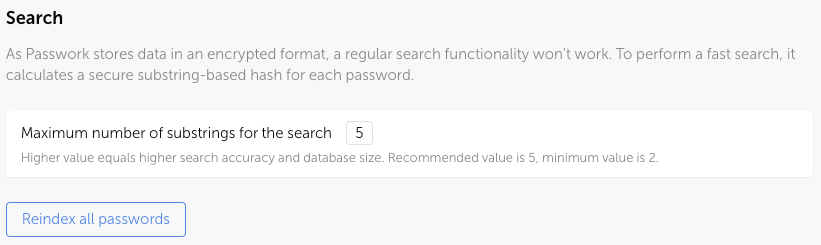
In Settings and Users → Background Tasks, the created task — Password Reindexing — will be displayed; after completion, check the Search functionality in Passwork.
LDAP settings
- Verify the correct loading of LDAP Users and Groups. To do this, open the connected LDAP server in LDAP Settings and click Update Users and Update Groups;
- If an error occurred during the update, it is necessary to enter the Service Account credentials;
If authorization was previously done Via Mask, it is necessary to configure the Service Account. Otherwise, connection to the LDAP server will be impossible.
- Verify authorization using an LDAP user in Passwork
SSO settings
Since Passwork 7 switched to a new backend, the Passwork (SP) endpoints have changed:
- Open SSO Settings in Passwork and go to the section — Passwork → Identity Provider;
- In the SSO provider (IdP) settings, specify the new endpoints for the Passwork application (SP).
You can also review the updated instructions on SSO Setup in Passwork 7.