



Docker
Configuring parameters in Passwork
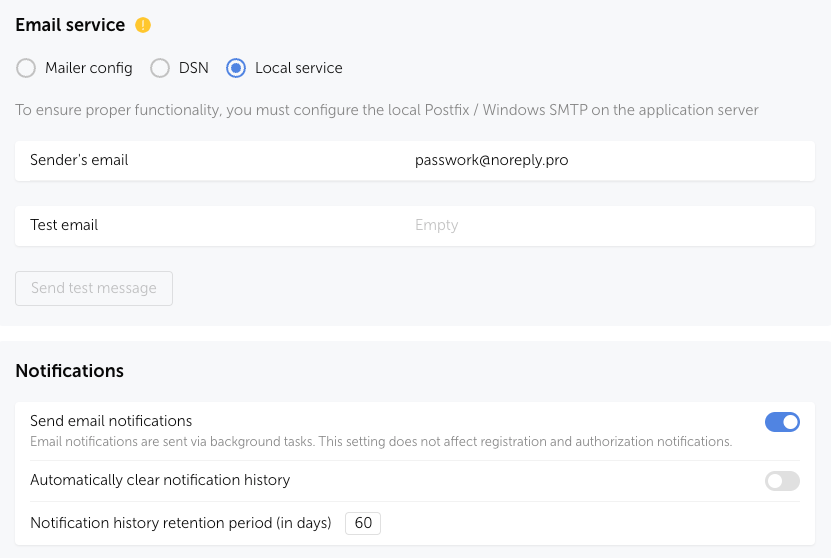
Open the Passwork web interface and go to Settings and Users → System Settings → Notifications section.
Enable the Send notifications by email option and in Mail Service select Local Service, specify the Sender Email and save the changes:
Configuring and changing parameters in Postfix
Configuring the SMTP sender address
Open or create the file — /<passwork>/conf/postfix/sasl_passwd:
nano /<passwork>/conf/postfix/sasl_passwd
Add the SMTP address with the sender user's login and password:
[mail.isp.example] [email protected]:password
Example of using a non-standard TCP port
[mail.isp.example]:587 [email protected]:password
Example of using Gmail:
[smtp.gmail.com]:587 [email protected]:password
Create a hashed database for Postfix by running the following command:
docker exec -it passwork_postfix postmap /etc/postfix/sasl_passwd
After execution, the Postfix database — sasl_passwd.db — will be located in the directory /<passwork>/conf/postfix/
Restricting access to data files
The created files contain SMTP credentials in plain text. For security reasons, read and write access should be granted only to the root user.
Assign ownership and set the owner to root user:
chown root:root /<passwork>/conf/postfix/sasl*
chmod 0600 /<passwork>/conf/postfix/sasl*
Configuring Postfix as a relay server
Edit the configuration file — /<passwork>/conf/postfix/main.cf:
nano /<passwork>/conf/postfix/main.cf
Add and edit the following parameters:
# Specify the server's FQDN
myhostname = hostname.passwork.local

# Specify your SMTP server parameter from the "Configuring the SMTP sender address" step
relayhost = [mail.isp.example]:587

# Add authentication enabling parameters at the end of the file
smtp_sasl_auth_enable = yes
smtp_sasl_security_options = noanonymous
smtp_sasl_password_maps = hash:/etc/postfix/sasl_passwd
smtp_use_tls = yes
smtp_tls_CAfile = /etc/ssl/certs/ca-certificates.crt
Save the changes and restart the Postfix service in the container:
docker exec -i passwork_postfix service postfix reload