


Windows Server configuration
To display Passwork events in the Event Viewer, it is necessary to additionally configure access rights. To do this, you need to:
Using the Start context menu
- Right-click on the Start icon in the lower-left corner of the screen.
- Select "Windows PowerShell (Administrator)" from the context menu.
Using the Start menu
- Left-click on the Start icon in the lower-left corner of the screen.
- Type
powershell - Open PowerShell as "Administrator" using the combination —
Ctrl + Shift + Enter
- Obtain security identifiers (SID) for accounts:
- PowerShell
$objUser = New-Object System.Security.Principal.NTAccount("group_name")
$strSID = $objUser.Translate([System.Security.Principal.SecurityIdentifier])
$strSID.Value
Standard accounts
-
IUSR (SID: S-1-5-17);
-
IIS_IUSRS (SID: S-1-5-32-568);
-
NETWORK SERVICE (SID: S-1-5-20).
-
Get access rights settings using CMD:
- CMD
wevtutil gl application > temp.txt
info
A temp.txt file will be created in the current directory.
- In the temp.txt file, edit the channelAccess line:
- Remove elements starting with (D;; and containing one of the obtained SID;
- Insert each obtained SID as an element in the format (A;;0x3;;;SID);
- Example for standard SIDs appended at the end of the channelAccess line:
- SID
(A;;0x3;;;S-1-5-17)(A;;0x3;;;S-1-5-32-568)(A;;0x3;;;S-1-5-20)
- Full line with standard security identifiers (SID):
- channelAccess
channelAccess: O:BAG:SYD:(A;;0x2;;;S-1-15-2-1)(A;;0xf0007;;;SY)(A;;0x7;;;BA)(A;;0x7;;;SO)(A;;0x3;;;IU)(A;;0x3;;;SU)(A;;0x3;;;S-1-5-3)(A;;0x3;;;S-1-5-33)(A;;0x1;;;S-1-5-32-573)(A;;0x3;;;S-1-5-17)(A;;0x3;;;S-1-5-32-568)(A;;0x3;;;S-1-5-20)
- Change access rights settings using CMD:
- CMD
wevtutil sl application /ca:O:BAG:SYD:(A;;0x2;;;S-1-15-2-1)(A;;0xf0007;;;SY)(A;;0x7;;;BA)(A;;0x7;;;SO)(A;;0x3;;;IU)(A;;0x3;;;SU)(A;;0x3;;;S-1-5-3)(A;;0x3;;;S-1-5-33)(A;;0x1;;;S-1-5-32-573)(A;;0x3;;;S-1-5-17)(A;;0x3;;;S-1-5-32-568)(A;;0x3;;;S-1-5-20)
info
After /ca: insert the value of the channelAccess parameter from temp.txt
- Run the following script in PowerShell for correct display of PHP events:
danger
Note:
- In the
$EventSourcevariable, specify PHP-version_number; to get the PHP version, run —php -vin PowerShell - In the
$PHPEventMessageFilevariable, specify the location of the php8.dll extension located in the root directory of the installed PHP
- PowerShell
# Define variables
$EventSource = "PHP-8.3.19"
$PHPEventMessageFile = "C:\Program Files\php8.3\php8.dll"
$EventLogPath = "HKLM:\SYSTEM\CurrentControlSet\Services\EventLog\Application\$EventSource"
$TypesSupported = 7

# Check and create key for event source
if (-not (Test-Path $EventLogPath)) {
    New-Item -Path "HKLM:\SYSTEM\CurrentControlSet\Services\EventLog\Application" -Name $EventSource -Force
}

# Configure parameters for event source
Set-ItemProperty -Path $EventLogPath -Name "EventMessageFile" -Value $PHPEventMessageFile -Type ExpandString
Set-ItemProperty -Path $EventLogPath -Name "TypesSupported" -Value $TypesSupported -Type DWord
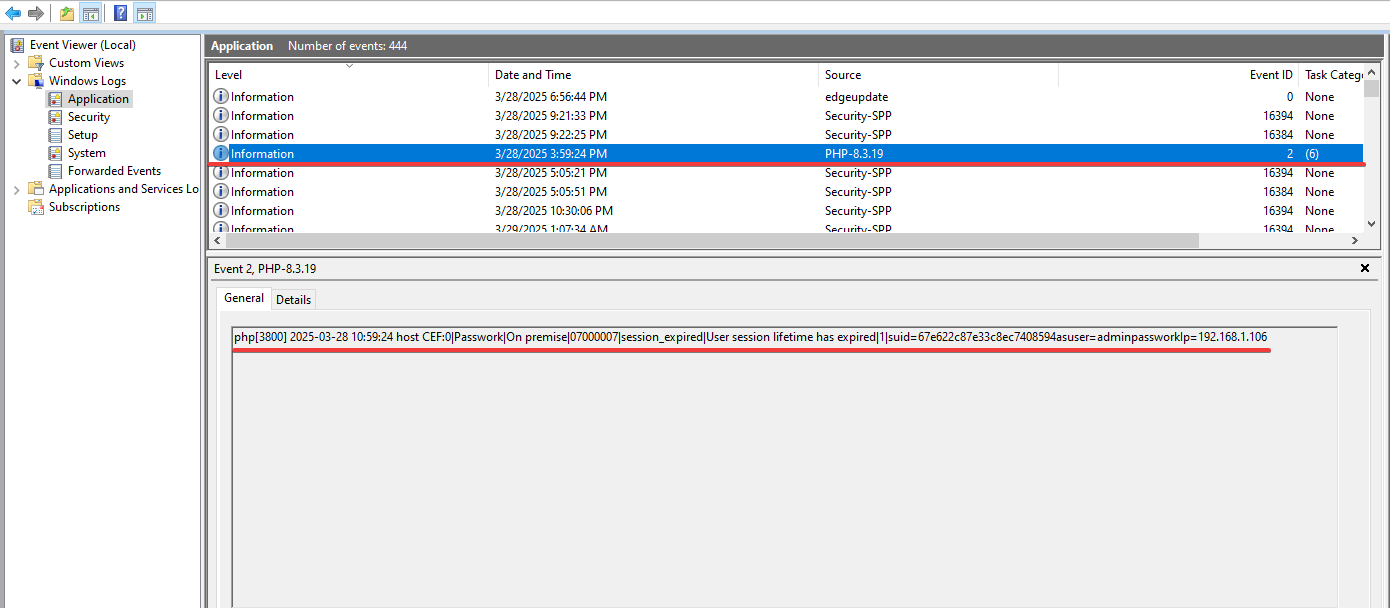
After completing these steps, Passwork events will be displayed in Event Viewer — Windows Logs → Application: