
Shadow IT is the use of unapproved technology without IT knowledge or oversight. Shadow AI is the use of unapproved AI tools, models, features, and workflows — and it is often riskier because it can process sensitive data, influence decisions, generate outputs, and interact with credentials or systems entirely outside normal governance.
The scale of the problem is already visible in breach data:
- One in five organizations reported a breach due to shadow AI, and high shadow AI usage added an average of $670,000 to breach costs — IBM's 2025 Cost of a Data Breach Report.
- More than half of executives (58%) reported that their organization experienced an AI-related security incident or a close call in the past year — Okta's AI Agents at Work 2026 survey.
- Over 1.27 million AI service secrets were found leaked on public GitHub. 81% more than the year before. Eight of the ten fastest-growing leaked secret types are tied to AI services — GitGuardian's State of Secrets Sprawl 2026.
- Only 5% of businesses have full visibility into which AI tools employees are actually using, and 78% either confirmed an AI-related security incident or could not rule one out — Check Point's 2026 Cloud Security Report.
- 92% of security professionals are concerned about AI agents and their security impact, yet only 37% of organizations have a formal AI policy in place — Darktrace's State of AI Cybersecurity 2026.
Governments have taken notice. The EU AI Act is now in active enforcement, with penalties for non-compliant use of high-risk AI systems reaching up to €15 million or 3% of global annual turnover.
In the United States, President Trump signed an executive order on June 2, 2026 — "Promoting Advanced Artificial Intelligence Innovation and Security" — directing CISA to expand AI-enabled cyber defenses across federal systems and critical infrastructure operators, and establishing a voluntary framework for assessing frontier AI models before public release. The order does not regulate how employees use AI inside enterprises, but it signals clearly that AI security is now a federal priority and that organizations operating critical infrastructure are already in scope.
The tools are in use. The data is moving. Where? Most organizations just don't know.
Key takeaways
- Shadow AI is a distinct risk category, not just Shadow IT with AI branding. Unapproved AI tools, models, and agents process data, influence decisions, and interact with credentials entirely outside normal governance, where traditional Shadow IT only creates unmanaged technology sprawl.
- The breach data is already visible. One in five organizations reported a breach due to Shadow AI. Most businesses have no clear picture of which AI tools employees are actually using.
- Personal accounts are the primary control gap. Most AI tool usage happens through personal accounts that bypass SSO, DLP, and centralized logging, leaving no audit trail and no contractual basis for data deletion.
- AI agents shift the problem from data input to access and action. Agents can read files, call APIs, and modify code through delegated OAuth permissions, and those actions may not be logged anywhere the security team can see.
- Credential exposure is the highest-severity gap. Logs, code snippets, environment files, and browser autofill data frequently contain passwords, API keys, or tokens. When pasted into an AI tool, the result is a potential persistent access path, not just a data exposure event.
- Blanket prohibition relocates Shadow AI, it doesn't eliminate it. Employees move to personal devices and alternative tools with fewer audit signals. Effective governance provides approved alternatives and monitors sensitive data movement.
- Regulators have taken notice. The EU AI Act is in active enforcement, with penalties reaching €15 million or 3% of global annual turnover. A U.S. executive order signed June 2, 2026 signals that AI security is now a federal priority.
- Governance requires five specific responses. Data classification, approved tool provisioning, output governance, agent permission review, and secrets management. Existing Shadow IT controls are necessary but not sufficient.
What is Shadow IT?
Shadow IT is any technology (software, hardware, cloud services, SaaS applications, scripts, or infrastructure) used within an organization without IT approval, knowledge, or oversight. The term covers a wide range of behavior: an employee using a personal cloud drive to share files, a team spinning up an unapproved project management tool, a developer running scripts on unmanaged infrastructure, or a department subscribing to a SaaS product outside the procurement process.
The core problem with Shadow IT is governance loss. When IT doesn't know a tool exists, it can't enforce access controls, apply Data Loss Prevention (DLP) policies, manage the data lifecycle, or revoke access when an employee leaves. Licensing, compliance, and audit trail requirements also fall through the gaps.
Shadow IT: from workaround to blind spot
controls
policies
trail
process
Shadow IT follows a predictable path. An employee needs a tool — faster file sharing, a project tracker, a script that runs on something other than the approved stack. The official process is too slow or the tool simply isn't available, so they find their own solution. IT never finds out.
Common Shadow IT examples include:
- Personal cloud storage (consumer accounts used for work files)
- Unapproved messaging and collaboration apps
- Browser extensions with broad data permissions
- Unmanaged SaaS subscriptions paid by a team budget
- Developer-built scripts and automation tools running outside IT visibility
- Consumer devices connected to corporate networks
Shadow IT is not always malicious. Most of it starts as a productivity workaround — a team needed a tool, procurement was slow, and someone found a free alternative. That context matters for governance: prohibition without replacement rarely works.
What is Shadow AI?
Shadow AI is the unsanctioned use of AI tools, AI features, models, prompts, agents, and workflows without IT approval or oversight. It is related to Shadow IT but distinct: where Shadow IT mainly creates unmanaged technology sprawl, Shadow AI creates unmanaged data processing, unmanaged decision support, and unmanaged action.
Shadow AI includes a broad and fast-growing set of behaviors. Employees use public large language models (LLMs) like ChatGPT, Claude, and Gemini through personal accounts. Developers use AI coding assistants such as GitHub Copilot or Cursor outside enterprise tenants. Teams use AI meeting assistants, AI browser extensions, and AI-powered SaaS features that were never formally reviewed. Some employees build their own AI workflows using consumer automation tools.
The Shadow AI chain
controls
revocation
trail
validation
governance
Shadow AI follows the same path as Shadow IT, but the consequences at the end are different. An employee needs to move faster — summarize a document, generate code, draft a response. There's no approved tool, or the approved tool is slower than the one they already use personally. So they use their own account, a browser extension, or an AI feature embedded in a SaaS product IT already approved but never audited.
Common examples of Shadow AI in practice:
- Employees using ChatGPT, Claude, Gemini, or Perplexity through personal free-tier accounts
- Developers using AI coding assistants outside enterprise license controls
- Sales and marketing teams using AI writing tools not reviewed by security
- HR and finance teams using AI to summarize documents containing regulated data
- AI meeting assistants recording and transcribing calls without enterprise retention controls
- Browser-based AI extensions with access to page content, clipboard, and form fields
- Employee-built AI agents connecting to SaaS APIs or internal systems
The scale is significant. Menlo Security's 2025 report recorded 10.53 billion visits to AI sites in January 2025 alone, up from 7 billion in February 2024, with 80% of that access happening through browsers. Shadow AI is not a niche behavior — it is how most employees currently use AI.
Shadow IT vs Shadow AI: The key differences
Shadow IT and Shadow AI share the same root cause: employees solving real problems with tools IT hasn't approved. But they create different risk profiles and require different controls.
| Dimension | Shadow IT | Shadow AI |
|---|---|---|
| Primary object | Unapproved software, hardware, services, infrastructure | Unapproved AI tools, AI features, models, agents, prompts, and workflows |
| Main risk | Data sprawl, unmanaged access, licensing, compliance gaps | Data exposure through prompts and uploads, model retention, hallucinated output, decision risk, agentic action |
| Visibility problem | Unknown apps or systems | Unknown tools, personal accounts, prompt content, file uploads, embedded AI features, agent permissions |
| Identity exposure | SaaS accounts, shared passwords, unmanaged access | Personal AI accounts, OAuth grants, API keys, code tokens, browser extensions, agent permissions |
| Control difficulty | Discover app, block or onboard, apply SSO and DLP | Detect prompt-level data flows, classify sensitive input, govern AI output, review model and provider settings |
| Remediation | Revoke access, migrate data, decommission app | Harder to confirm deletion, retention exclusion, prompt exposure, model-side processing |
The remediation gap is particularly significant. When an employee uses an unapproved SaaS tool, IT can revoke access and migrate data. When sensitive content enters an external AI model's workflow, confirming deletion, proving non-retention, and scoping the incident is substantially harder, especially when the tool was accessed through a personal account with no enterprise audit trail.
Why Shadow AI is the bigger threat
Shadow AI is often more dangerous than traditional Shadow IT because it doesn't just store or move data — it processes, generates, and acts on it. The following five dimensions explain where the risk model changes. Together, they form what this article calls the Shadow AI risk multiplier.
1. Data exfiltration happens through ordinary work
Employees don't need to exfiltrate data intentionally. They paste emails, contracts, spreadsheets, source code, support tickets, customer records, HR information, and system logs into AI tools as part of normal work. Each prompt is a potential data transfer.
Harmonic Security's analysis of 22,458,240 enterprise GenAI prompts from 2025 detected 579,113 sensitive data exposure instances across 665 AI tools. Code, legal documents, and financial data accounted for 74.5% of what was exposed. According to Cyberhaven's 2026 AI Adoption & Risk Report, 39.7% of all AI interactions involved sensitive data, and employees input sensitive data into AI tools once every three days on average.
Sensitive data and AI are now embedded in daily workflows, and the exposure is not occasional.
2. Personal accounts break enterprise controls
A significant share of AI usage happens through personal accounts rather than enterprise tenants. Cyberhaven's 2026 data found that 32.3% of ChatGPT usage, 58.2% of Claude usage, and 60.9% of Perplexity usage occurred through personal accounts. Menlo Security's 2025 report found that 68% of employees used free-tier AI tools via personal accounts, with 57% inputting sensitive data.
Personal accounts bypass SSO enforcement, enterprise retention policies, centralized logging, DLP controls, and admin-level data governance. When an employee uses Claude or Perplexity through a personal account, the organization has no visibility into what was submitted, no audit trail, and no contractual basis for data deletion or non-training commitments.
3. AI can influence decisions, not just store files
Shadow IT mainly creates unmanaged data storage or transfer. Shadow AI does something more: it summarizes, classifies, ranks, recommends, generates code, and drafts customer-facing or legal content. An unapproved AI tool can shape a business decision based on unverified data, an unknown model version, and assumptions the user never examined.
Hallucinations, model drift, and bias in AI output are real failure modes. When the tool is unsanctioned and the output is unattributed, there is no way to audit the decision chain after the fact.
4. AI agents extend the problem from input to action
AI agents can read files, use clipboards, call APIs, send messages, modify code, and connect to SaaS systems. Many run at the operating system level, maintain persistent context windows, and synchronize data to infrastructure outside security team oversight.
This moves Shadow AI from a data-input problem to an access-and-action problem. An agent with delegated OAuth permissions or an API key can act on behalf of a user, and those actions may not be logged anywhere the security team can see.
5. Credential and secrets exposure turns AI use into access risk
Logs, code snippets, environment files, browser autofill data, and support tickets frequently contain passwords, API keys, or tokens. When these get pasted into an AI tool — often accidentally — the result is not just a data exposure event. It is a potential persistent access path.
IBM's 2025 report found that 97% of organizations compromised through AI models or applications lacked proper AI access controls, which means most organizations that experienced an AI-related breach had no meaningful control layer in place.

If your team is starting to map Shadow AI exposure, credentials and secrets are often the highest-severity gap. Passwork centralizes shared passwords, API keys, and service account credentials in a single encrypted vault with RBAC, LDAP/SSO integration, and a full audit log of every access event. When an employee leaves or an AI workflow is decommissioned, access is revoked in one place, not tracked down across a dozen tools. Try Passwork free
Real-world examples of Shadow AI risk
The risk scenarios below are representative of what security and IT teams encounter across departments. None require malicious intent — each starts with a legitimate productivity goal.
| Scenario | What the employee wants | What can go wrong | Safer alternative |
|---|---|---|---|
| Developer pastes code into AI assistant | Debug faster | Source code, API keys, or architecture details leave governed systems | Enterprise coding assistant, token scanning, secret rotation |
| Sales team uploads customer notes | Draft a proposal | Customer data and pricing strategy enter a personal AI account | Approved AI workspace with DLP and data classification |
| HR team summarizes employee records | Save time on reporting | PII or sensitive employment data leaves the controlled HR system | Approved workflow with access controls and logging |
| Legal team asks AI to review a contract | Speed up review | Confidential terms or M&A details are exposed to an external model | Enterprise AI tool with retention controls and legal review |
| Employee uses an AI browser extension | Automate repetitive work | Extension reads page content, clipboard, or form data | Approved extension policy and browser governance |
Risk tends to concentrate in a small number of high-usage tools, which is useful for governance prioritization. But the long tail still matters — a rarely used integration can carry the same credential exposure risk as a daily-use assistant.
Why banning AI usually makes Shadow AI worse
A blanket ban on AI tools does not eliminate Shadow AI. It relocates it. Employees move to personal devices, personal accounts, or alternative tools that IT has less visibility into. The result is the same data exposure with fewer audit signals.
According to Okta survey published in May 2026, more than half of employees reported using personal AI tools without approval. Two-thirds of U.S.-based employees use unsanctioned AI, and nearly a quarter do so regularly. At the same time, 58% of executives said their organization had an AI-related security incident or close call in the previous year.
The Okta research also found that more than half of employees say their organization's AI usage policies are unclear, difficult to find, or non-existent. That gap between executive confidence and employee experience is where Shadow AI grows.
Some high-risk use cases should be blocked outright — pasting customer records into a public AI tool, or connecting a consumer AI agent to production systems. But blanket prohibition doesn't work. Employees adopt shadow AI for rational reasons: better tools, faster results, procurement that moves too slowly. Effective governance provides approved alternatives, sets clear boundaries, and monitors sensitive data movement. Ignore the underlying incentives and the behavior won't change.
How to detect Shadow AI in the enterprise
Detecting shadow AI requires visibility across browsers, endpoints, SaaS permissions, and identity systems. IBM's 2025 research found that only 34% of organizations with AI governance policies performed regular audits for unsanctioned AI — meaning most organizations have policy without operational visibility.
A practical detection approach covers seven areas
- Step 1. Inventory AI domains, browser extensions, SaaS AI features, AI meeting tools, AI coding assistants, and AI features embedded in already-approved applications.
- Step 2. Monitor browser-based GenAI usage, copy/paste events, file uploads, and downloads where legally and ethically appropriate under your jurisdiction's employee monitoring rules.
- Step 3. Review OAuth grants, API tokens, service accounts, and third-party app permissions. AI agents and integrations often request broad OAuth scopes that persist long after initial setup.
- Step 4. Classify sensitive data categories that should never be submitted to external AI tools without explicit approval: PII, source code, financial forecasts, legal documents, regulated health data, and credentials.
- Step 5. Check identity controls: SSO coverage, MFA enforcement, SCIM/LDAP provisioning, RBAC assignments, and audit log completeness. Personal AI accounts bypass all of these.
- Step 6. Search for exposed credentials in code repositories, logs, tickets, and AI-related workflows. Tokens and API keys appear in unexpected places — commit history, Slack threads, support tickets, and AI prompt logs.
- Step 7. Map AI usage to business need before blocking it. Understanding why employees use a tool is necessary for providing a governed alternative that they will actually use.
How to reduce Shadow AI risk without blocking productivity
Effective Shadow AI governance is an enablement problem as much as a security problem. The goal is to give employees safe, approved options while applying controls where sensitive data is at risk.
| Control layer | What to do | Why it matters |
|---|---|---|
| Policy | Define allowed, restricted, and prohibited AI use cases by data type and department | Employees need clear rules before they can comply |
| Approved tools | Provide enterprise AI options with SSO, admin controls, and contractual retention terms | Reduces the incentive to use personal accounts |
| Data controls | Define data types that cannot enter public AI tools | Protects PII, IP, source code, secrets, legal and financial data |
| Identity and access | Enforce SSO, MFA, RBAC, LDAP/SCIM, and lifecycle management | Keeps AI access tied to user roles and employment status |
| Passwords and secrets | Centralize shared credentials, API keys, service accounts, and rotation schedules | Reduces persistent access risk when AI workflows touch secrets |
| Monitoring | Use DLP, browser security, CASB/SSPM, logs, and SIEM where appropriate | Creates evidence and response capability |
| Training | Teach examples, not abstract warnings | Employees learn what to do in real workflows |
| Review cadence | Reassess AI tools, permissions, retention terms, and subprocessors regularly | AI tool capabilities and regulations change quickly |
The identity and access layer needs three things: SSO coverage across approved AI tools, MFA enforcement, and SCIM or LDAP provisioning that ties access directly to employment status. For passwords and secrets, a centralized vault with role-based access control, Active Directory integration, and activity logs turns credential management from a manual chore into an auditable process.
Where passwords and secrets fit into Shadow AI governance
Shadow AI governance is about what credentials and permissions AI-adjacent tools can reach.
Credential exposure in AI workflows often happens indirectly:
- A developer pastes a log file into a coding assistant — the log contains a database connection string
- A support engineer shares a screenshot in an AI tool — the screenshot shows an API key in a browser tab
- An employee uploads an environment configuration file for AI-assisted debugging — the file contains service account credentials
None of these are deliberate exfiltration events. All of them create real access risk.
AI coding assistants and agents compound this. They can interact with repositories, terminals, SaaS APIs, and local file systems. An agent with access to a developer's terminal session can read environment variables, SSH keys, and credential files. If that agent runs through a personal account with no enterprise audit trail, the organization has no record of what was accessed.
The governance goal is to prevent unmanaged AI workflows from turning a pasted token or shared password into a persistent access path. That requires specific controls: unique credentials per service, no shared passwords in chat or tickets, vault-based sharing with access controls, least privilege on service accounts, MFA on all administrative access, regular secret rotation, API key inventory, OAuth permission reviews, and audit logs covering credential access.
Passwork is available as a self-hosted deployment or in the cloud, with a full REST API and CLI tools for teams that need to integrate credential management into existing DevOps workflows. Access reviews, audit logs, and role assignments are managed through a single interface — no separate tooling required. Learn more
A practical Shadow AI governance checklist
This checklist is designed for security engineers and compliance teams beginning or maturing a Shadow AI governance program. Review it quarterly — AI tool capabilities and regulatory requirements change faster than annual cycles can track.
The Shadow AI governance checklist (10 points)
- Define approved, conditional, and prohibited AI use cases by data type and business function.
- Create a list of approved AI tools by function: writing, coding, data analysis, meeting notes, customer support.
- Require enterprise accounts for approved tools where sensitive data may be processed.
- Block or warn on public upload of restricted data categories (PII, source code, financial forecasts, legal documents, credentials).
- Review AI browser extensions and OAuth permissions — revoke those without a documented business need.
- Audit API tokens, service accounts, shared credentials, and secrets used near AI workflows.
- Add DLP or browser controls for prompts, file uploads, and copy/paste events where appropriate and legally permitted.
- Publish examples of allowed and prohibited prompts — concrete examples outperform abstract policy.
- Train teams by role: developers, sales, legal, HR, finance, and support face different AI risk scenarios.
- Review AI policies quarterly because tool capabilities, vendor retention terms, and regulations change quickly.
Conclusion

Shadow AI is not a reason to slow AI adoption. It is a reason to govern AI as a data, identity, and access problem — the same disciplines that security teams already apply to other technology, applied to a faster-moving and harder-to-observe category.
The five dimensions of the Shadow AI risk multiplier — data exfiltration through ordinary work, personal accounts that break enterprise controls, AI-influenced decisions, agentic action, and credential exposure — explain why existing Shadow IT controls are necessary but not sufficient. Each dimension requires a specific response: data classification, approved tool provisioning, output governance, agent permission review, and secrets management.
The organizations that manage this well are the ones that give employees safe options, define clear rules, and build the monitoring capability to see what is actually happening.
If your team is reviewing Shadow AI controls, include shared passwords, API keys, service accounts, and secrets in the assessment. Passwork supports this part of the governance program by centralizing credential access, integrating with LDAP/SSO, and providing audit visibility for password-related workflows.
Frequently Asked Questions

Is Shadow AI the same as Shadow IT?
No. Shadow AI is related to Shadow IT but specifically involves unapproved AI tools, AI features, models, prompts, agents, and workflows. It adds distinct risks around data processing through prompts and file uploads, model retention, generated output quality, and delegated permissions for AI agents. Traditional Shadow IT mainly creates unmanaged technology sprawl.
Why is Shadow AI more dangerous than Shadow IT?
Shadow AI is often more dangerous because it can expose sensitive data through prompts and file uploads, influence business decisions through unverified outputs, and interact with credentials or systems through agents and integrations. IBM's 2025 research found that organizations with high shadow AI usage incurred an average of $670,000 more in breach costs than those with low or no shadow AI usage.
What data should employees never paste into public AI tools?
Employees should not paste passwords, API keys, tokens, source code, customer records, HR records, legal documents, financial forecasts, regulated data (health records, PII), or confidential IP into public AI tools unless the organization has explicitly approved that tool and use case with appropriate contractual data protections in place.
Can companies completely stop Shadow AI?
Most organizations should not rely on complete prohibition. Harmonic Security's 2025 data found that while only 40% of companies have purchased official AI subscriptions, employees at over 90% of organizations actively use AI tools — mostly through personal accounts. A better strategy is to provide approved AI tools, define clear use cases, monitor sensitive data movement, and enforce access controls.
How can security teams detect Shadow AI?
Detection requires a combination of AI domain inventory, browser visibility tools, DLP, SaaS security posture review (SSPM), OAuth grant review, endpoint telemetry, and employee reporting. Security teams should also audit AI features embedded in already-approved SaaS tools — these are often overlooked because the parent application is sanctioned.
How do password managers help with Shadow AI risk?
Password managers do not govern AI by themselves, but they reduce credential sprawl around AI workflows. They help centralize shared credentials, enforce role-based access controls, support audit trails for password and secret use, simplify secret rotation, and provide visibility into which credentials are shared and with whom — all of which matter when AI tools or agents may have touched those credentials.
Does the EU AI Act address Shadow AI?
The EU AI Act (in force from August 2024, with phased obligations through 2027) establishes requirements for AI system providers and deployers, including transparency, risk classification, and governance obligations for high-risk AI systems. It does not directly regulate employee use of consumer AI tools, but organizations subject to the Act should ensure their AI governance programs cover unsanctioned use, particularly for high-risk use cases. Legal teams should review applicable obligations under the specific articles relevant to their AI deployment context.
 Alex Muntyan
 Alex Muntyan
 Alex Muntyan
Table of contents
- Key takeaways
- What is Shadow IT?
- What is Shadow AI?
- Shadow IT vs Shadow AI: The key differences
- Why Shadow AI is the bigger threat
- Real-world examples of Shadow AI risk
- Why banning AI usually makes Shadow AI worse
- How to detect Shadow AI in the enterprise
- How to reduce Shadow AI risk without blocking productivity
- Where passwords and secrets fit into Shadow AI governance
- A practical Shadow AI governance checklist
- Conclusion
- Frequently Asked Questions
Table of contents
- Key takeaways
- What is Shadow IT?
- What is Shadow AI?
- Shadow IT vs Shadow AI: The key differences
- Why Shadow AI is the bigger threat
- Real-world examples of Shadow AI risk
- Why banning AI usually makes Shadow AI worse
- How to detect Shadow AI in the enterprise
- How to reduce Shadow AI risk without blocking productivity
- Where passwords and secrets fit into Shadow AI governance
- A practical Shadow AI governance checklist
- Conclusion
- Frequently Asked Questions
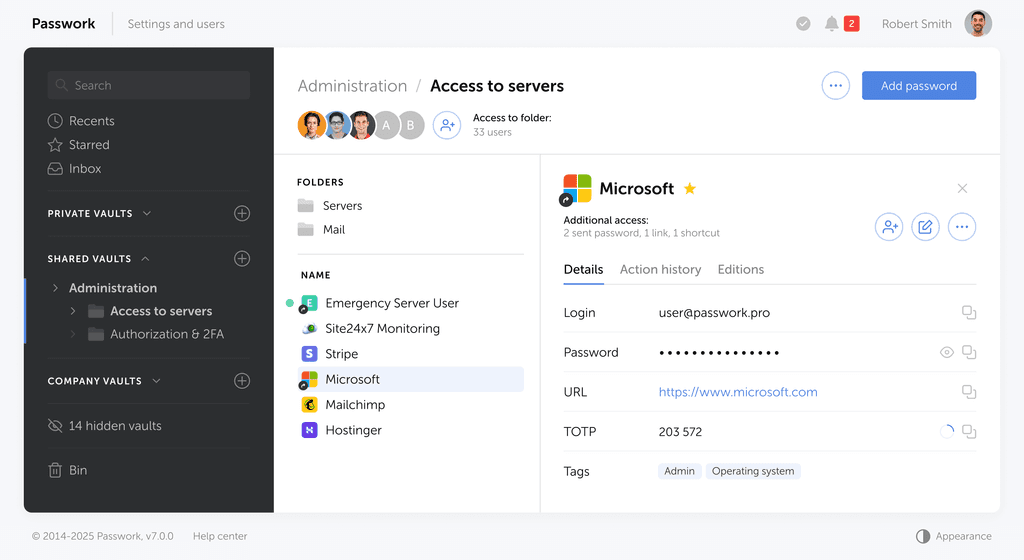
Self-hosted password manager for business
Passwork provides an advantage of effective teamwork with corporate passwords in a totally safe environment. Double encryption and zero-knowledge architecture ensure your passwords never leave your infrastructure.
Learn more