
Introduction
160,000+ organizations across the EU are now subject to NIS2. 21 of 27 member states have transposed the directive into national law — and under Article 32 of Directive (EU) 2022/2555, management bodies can be held personally liable for non-compliance. Fines reach €10 million or 2% of global annual turnover for essential entities.
The compliance burden is significant. Mid-sized organizations frequently invest €200,000–€600,000 in the first year alone, depending on sector and security maturity (Kiteworks, 2025). Yet most of that spend goes toward controls that generate no operational return.
A business password manager is a rare exception. It simultaneously satisfies two of NIS2's most audited requirements (access control and MFA) while cutting IT overhead and generating the timestamped evidence that regulators actually demand. The investment pays back in weeks, not years. This article shows exactly how.
Key takeaways
The financial reality of NIS2 compliance in 2026
NIS2 compliance is expensive — but the cost of non-compliance is structurally higher. Understanding where the money goes is the first step toward spending it more efficiently.
Mid-sized companies typically face first-year compliance investments ranging from €200,000 to €600,000, with energy and transport sector organizations at the upper end of that range due to operational technology complexity. Hidden costs — legacy system integration, change management, regulatory interpretation — consistently exceed initial estimates (Kiteworks, 2025).
The EU faces a structural shortage of approximately 299,000 cybersecurity professionals (ENISA NIS Investments 2025). IT teams cannot absorb the compliance burden manually. The ENISA report confirms that investments are shifting from people to technology — not by choice, but by necessity.
The financial case for automation is measurable. Organizations that apply automation to compliance workflows report up to a 40% reduction in compliance costs and an 80% reduction in audit preparation time (Forrester, cited in Passwork NIS2 Compliance Reporting, 2026). In breach scenarios, automation saves an average of $2.2 million compared to organizations operating without it (IBM Cost of a Data Breach Report, 2025).
The implication is direct: smart tool selection compresses the compliance timeline and reduces total cost of ownership. A business password manager is among the highest-ROI investments available to a compliance team working within a constrained budget.
How a business password manager maps directly to NIS2 Article 21
NIS2 Article 21 requires organizations to implement technical and operational measures covering access control, authentication, and supply chain security. A business password manager addresses each of these obligations directly — not as a workaround, but as purpose-built infrastructure.
Article 21(2)(i) of Directive (EU) 2022/2555 mandates "access control policies and asset management." Article 21(2)(j) requires multi-factor authentication. Article 21(2)(d) extends security obligations to the supply chain. Each maps to specific capabilities in an enterprise credential management solution.
Access control and identity governance
Role-Based Access Control (RBAC) is the operational mechanism behind Article 21(2)(i). A business password manager enforces the principle of least privilege at scale: each user accesses only the credentials their role requires, with permissions set at the vault, folder, and individual credential level.
Integration with Active Directory, Azure AD, and LDAP means access rights reflect organizational structure automatically. When an employee changes roles or leaves the organization, access is revoked through the same directory sync — no manual cleanup, no orphaned credentials. This is identity governance that auditors can verify, not just a policy document on a shared drive.
Enforcing multi-factor authentication (MFA)
Article 21(2)(j) requires MFA across systems handling sensitive data. A business password manager enforces TOTP, hardware key (FIDO2/WebAuthn), or dedicated 2FA organization-wide — not as an optional setting, but as an administrative policy that users cannot bypass.
This matters because credential compromise remains the dominant initial access vector. According to the Verizon 2025 Data Breach Investigations Report, 88% of web application attacks involve stolen credentials. MFA enforcement at the credential management layer closes the gap between policy intent and operational reality.
Securing the supply chain
NIS2 Article 21(2)(d) extends accountability to suppliers and service providers. If a breach traces back to shared credentials passed to a third party via email or a shared spreadsheet, the organization bears liability.
A business password manager with controlled credential sharing eliminates this vector. Credentials are shared through encrypted, permission-scoped channels — the supplier receives access, not the password itself. Access can be revoked instantly, and every sharing event is logged with a timestamp.
👉 Passwork covers all three Article 21 obligations out of the box — RBAC, MFA enforcement, and controlled credential sharing — with full LDAP/AD integration and timestamped audit logs. See how Passwork maps to NIS2 →
The hidden ROI: How a password manager for business saves money
Most compliance tools add process overhead. A well-deployed password manager for business removes it — while generating the evidence that regulators demand. The ROI case rests on three measurable pillars.
Eliminating the $70 password reset
Forrester Research estimates each password reset costs $70 in IT labor and lost productivity. Password resets account for up to 30% of all helpdesk tickets — a persistent, invisible drain on IT capacity.
For a 500-person organization averaging two resets per employee per year, that is $70,000 in annual helpdesk cost from password resets alone. A self-service password manager eliminates the majority of these tickets. The data from real deployments confirms the scale: the average organization saved $64,610 in a single year through self-service password resets (Specops/Forrester, 2025).
Against a business password manager cost of approximately $4–$8 per user per month, the payback period for a 500-person organization is measured in weeks.
Reducing audit preparation time by up to 80%
Compliance audits consume disproportionate IT capacity. A team spending 200 hours preparing for a single audit cycle — gathering access logs, reconstructing permission histories, compiling evidence packages — is a team not working on security.
Organizations using automation for compliance evidence collection reduce audit preparation time by up to 80% (Forrester, cited in Passwork NIS2 Compliance Reporting, 2026). A business password manager with exportable audit logs in CSV and JSON format transforms weeks of manual evidence gathering into a single export operation. The compliance officer gets a forensically sound record; the IT team gets their time back.
Mitigating the risk of a €10 million fine
The IBM 2025 Cost of a Data Breach Report places the average global breach cost at $4.44 million. Under NIS2, a breach caused by inadequate access controls can trigger both the remediation cost and a regulatory fine of up to €10 million or 2% of global annual turnover for essential entities (NIS2 Directive, Article 34).
A credential management solution that prevents unauthorized access and generates the audit evidence to demonstrate compliance materially reduces both exposures. The fine avoidance value alone — even at a fraction of the maximum — exceeds the cost of enterprise password management by orders of magnitude.
ROI summary: 500-person organization
| Cost driver | Without password manager | With password manager |
|---|---|---|
| Annual password reset cost | $70,000 | ~$5,000 (residual) |
| Audit preparation (hours) | 200 hrs/cycle | ~40 hrs/cycle |
| Breach risk (credential vector) | High — no centralized control | Reduced — MFA + RBAC enforced |
| NIS2 fine exposure | Full — no audit evidence | Reduced — exportable logs |
| Annual tool cost (500 users @ $6/mo) | — | ~$36,000 |
Why spreadsheets and legacy tools fail NIS2 audits
NIS2 does not merely require organizations to be secure. It requires them to prove they are secure. If an access event is not logged with a timestamp, it did not happen in the eyes of a regulator.
Supervisory reviews under Article 29 of Directive (EU) 2022/2555 expect timestamped, exportable evidence of access control policies in operation. A shared Excel file, a browser-saved password list, or a consumer password app cannot provide this. They have no audit trail, no custom user roles, no LDAP integration, and no API for automated evidence collection.
The failure point becomes acute when an incident occurs. Under Article 23 of Directive (EU) 2022/2555, organizations have 24 hours to issue an early warning and 72 hours to file a full incident notification. Without a centralized, timestamped log of who accessed which credentials and when, that timeline is operationally impossible to meet.
Reconstructing access history from scattered sources — email threads, browser history, shared drives — under active incident pressure is not a compliance strategy. It is a liability. A business password manager with immutable audit logs makes the reconstruction instantaneous: filter by user, credential, or time range, export, and submit.
The distinction between a consumer app and an enterprise credential management solution is not scale — it is the presence of governance, auditability, and integration features that regulators require.
Manual compliance vs. password manager approach
| Dimension | Manual / legacy approach | Business password manager |
|---|---|---|
| Audit trail quality | None or fragmented | Timestamped, immutable, exportable |
| MFA enforcement | Optional, inconsistent | Policy-enforced, organization-wide |
| Helpdesk cost (resets) | $70/ticket, up to 30% of tickets | Near-zero (self-service) |
| Incident response speed | Hours to days (manual reconstruction) | Minutes (single log export) |
| LDAP/AD integration | None | Native sync |
| NIS2 Article 21 coverage | Partial at best | Direct, documented |
| Regulatory evidence | Cannot produce | CSV/JSON export on demand |
👉 When a 72-hour reporting clock starts, you need answers in minutes — not days. Passwork's audit logs are exportable in the formats regulators expect. Explore Passwork's audit capabilities →
Key features to look for in a NIS2-compliant password manager
A NIS2-ready business password manager is defined by its governance and auditability capabilities — not just its encryption. Use this framework when evaluating options.
| Feature | NIS2 relevance |
|---|---|
| Role-Based Access Control (RBAC) | Article 21(2)(i): Access control policies |
| Zero-knowledge / AES-256 encryption | Article 21(2)(h): Encryption requirements |
| TOTP / hardware key MFA enforcement | Article 21(2)(j): Multi-factor authentication |
| Active Directory / LDAP / SAML SSO integration | Article 21(2)(i): Identity governance |
| Exportable audit logs (CSV/JSON) | Article 29: Supervisory evidence requirements |
| Self-hosted / on-premise deployment | Data sovereignty and GDPR alignment |
| API for automation | Article 21 compliance automation |
| Controlled credential sharing | Article 21(2)(d): Supply chain security |
Consumer-grade password managers lack most of these capabilities. They are designed for individual convenience, not organizational accountability. The absence of RBAC, LDAP integration, and exportable audit logs is not a feature gap — it is a compliance disqualifier under NIS2.
Passwork covers all eight capabilities in a single self-hosted deployment. The architecture is zero-knowledge, the source code is open for audit, and the platform is ISO 27001:2022 certified — built specifically for organizations that need documented compliance, not just security.
Conclusion: Compliance as an operational advantage
NIS2 compliance is not optional, and the cost of non-compliance — fines up to €10 million, personal management liability, breach remediation averaging $4.44 million — dwarfs the cost of the right tooling.
A business password manager is unique among compliance investments because it delivers on two fronts simultaneously. It reduces operational costs through self-service password resets and automated audit evidence collection. It reduces risk through enforced MFA, RBAC, and the centralized credential logs that make the 72-hour incident reporting window achievable.
Unlike most compliance tools that add process overhead, a well-deployed password manager for business removes friction for end users while generating the cryptographic evidence that auditors demand. The payback period is weeks. The compliance coverage is direct and documentable against NIS2 Article 21.
The question for IT directors and compliance officers is not whether to invest in credential management — it is whether the tools currently in place can produce the evidence a regulator would accept today.
Assess your current posture against the NIS2 Article 21 checklist. If the answer to "can you export a timestamped log of every credential access event from the past 12 months?" is anything other than "yes, immediately" — the gap is already open.
👉 Passwork is a self-hosted, zero-knowledge password manager built for NIS2 compliance. Full audit logs, RBAC, MFA enforcement, and LDAP integration — deployed on your infrastructure, under your control. Start a free trial or request a demo →
FAQ
What does NIS2 require for password and credential management?
NIS2 Article 21(2)(i) mandates access control policies and asset management; Article 21(2)(j) requires multi-factor authentication. Together, these obligations mean organizations must enforce who can access which credentials, log every access event with a timestamp, and demonstrate MFA use across sensitive systems. Consumer password tools and spreadsheets do not satisfy these requirements.
How does a password manager help with NIS2 Article 21 compliance?
A business password manager addresses Article 21 directly through Role-Based Access Control, organization-wide MFA enforcement, LDAP/Active Directory integration, and immutable audit logs. Each capability maps to a specific Article 21 sub-clause and generates the documented evidence that supervisory authorities expect during reviews under Article 29.
What is the ROI of a business password manager for NIS2 compliance?
For a 500-person organization, password resets alone cost approximately $70,000 per year in IT labor and lost productivity (Forrester, 2025). A self-service password manager eliminates most of that cost — the average organization saves $64,610 annually (Specops/Forrester, 2025). Against a tool cost of $4–$8 per user per month, the payback period is typically under 90 days.
Why do spreadsheets and consumer password apps fail NIS2 audits?
They produce no audit trail, support no custom user roles, and cannot integrate with LDAP or Active Directory. Under NIS2 Article 29, supervisory authorities expect timestamped, exportable evidence of access control policies in operation. A shared spreadsheet cannot provide this. When an incident triggers the 72-hour notification clock under Article 23, organizations without centralized credential logs face an operationally impossible reconstruction task.
What is the maximum fine for NIS2 non-compliance?
For essential entities, NIS2 Article 34 sets the maximum administrative fine at €10 million or 2% of global annual turnover, whichever is higher. For important entities, the ceiling is €7 million or 1.4% of global annual turnover. Management bodies can also be held personally liable under Article 32, including temporary bans from management roles.
Does a self-hosted password manager help with GDPR as well as NIS2?
Yes. A self-hosted deployment keeps all credential data within the organization's own infrastructure, eliminating dependency on third-party cloud services and addressing GDPR data sovereignty requirements. AES-256 client-side encryption ensures that credential data remains unreadable even to the vendor. Organizations in the EU can satisfy both NIS2 Article 21 and GDPR data protection obligations through a single deployment.
How quickly can a password manager be deployed for NIS2 compliance?
Passwork deploys in approximately 30 minutes via Docker, Windows Server, or Linux. LDAP group mapping auto-syncs the existing Active Directory structure, so permission hierarchies do not need to be rebuilt manually. From download to live deployment, a team with standard infrastructure access can be fully operational within a single working session.
Table of contents
- Introduction
- Key takeaways
- The financial reality of NIS2 compliance in 2026
- How a business password manager maps directly to NIS2 Article 21
- The hidden ROI: How a password manager for business saves money
- Why spreadsheets and legacy tools fail NIS2 audits
- Key features to look for in a NIS2-compliant password manager
- Conclusion: Compliance as an operational advantage
- FAQ
Table of contents
- Introduction
- Key takeaways
- The financial reality of NIS2 compliance in 2026
- How a business password manager maps directly to NIS2 Article 21
- The hidden ROI: How a password manager for business saves money
- Why spreadsheets and legacy tools fail NIS2 audits
- Key features to look for in a NIS2-compliant password manager
- Conclusion: Compliance as an operational advantage
- FAQ
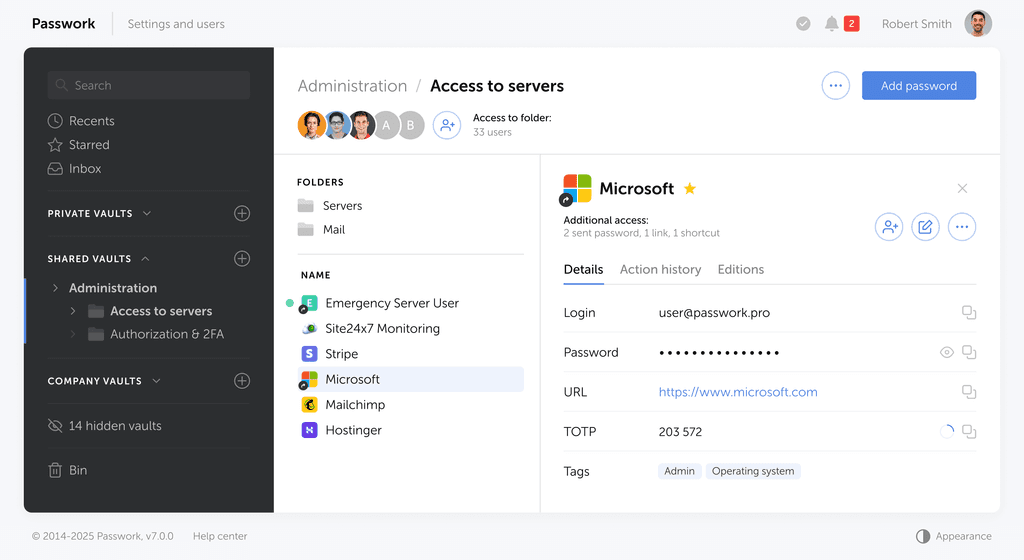
Self-hosted password manager for business
Passwork provides an advantage of effective teamwork with corporate passwords in a totally safe environment. Double encryption and zero-knowledge architecture ensure your passwords never leave your infrastructure.
Learn more