

Credentials move between people every day. A developer gets a database credential via Slack. A contractor receives an admin account through email. Finance keeps the payroll system login in a shared spreadsheet. Each handoff is a breach waiting to happen—and in 2026, waiting is measured in minutes.
Key takeaways
- 88% of web application breaches involve stolen credentials, often from shared accounts.
- AI-enhanced cracking tools now compromise 8-character passwords in under 12 minutes.
- 61% of employees share work passwords despite knowing the risks.
- Frictionless governance—combining password managers, RBAC, and audit trails—eliminates sharing without slowing teams down.
The hidden dangers of insecure password sharing in 2026
Shared passwords are the easiest attack vector in your infrastructure. When credentials move between people—via email, chat, or a sticky note—they stop being secrets. They become liabilities.
In 2026, the threat landscape has shifted. According to the Verizon 2026 Data Breach Investigations Report, 88% of web application breaches involve stolen or compromised credentials. That's not a vulnerability in code; it's a vulnerability in how humans handle access. AI-enhanced tools now crack standard 8-character passwords in under 12 minutes using consumer-grade GPUs—a 40% acceleration from 2023. When a shared password sits in an email thread or a team chat, it's not a matter of if it will be compromised, but when.
Shared accounts create multiple attack vectors:
- Credential stuffing: Attackers use breached credentials from one system to test access across others. A shared password exposed in one breach becomes the key to your entire infrastructure.
- Brute-force attacks: With AI acceleration, weak shared passwords fall in minutes. An 8-character passphrase that took hours to crack in 2023 now takes 12 minutes.
- Account takeover (ATO): Once an attacker gains a shared credential, they move laterally through your systems, often undetected because the account is used by multiple people.
- Insider threats: Shared accounts destroy accountability. When five people use the same login, you can't tell who deleted the database or transferred funds.
The real danger isn't the password itself—it's the loss of visibility. You don't know who accessed what, when, or why. That's a compliance nightmare and a security disaster.
Beyond convenience: why employees still share passwords (and the real cost)
If shared passwords are so dangerous, why do teams still use them?
The answer is friction. Individual logins require authentication. MFA adds another step. Password managers need setup. Legacy systems don't support individual accounts. It's easier to hand someone a password than to wait for IT to provision an account.
According to research cited in industry studies, 61% of employees are more likely to share work passwords than personal ones. The logic is simple: work credentials feel less personal, less risky. But that logic is backwards. A shared work password is shared with everyone—IT staff, contractors, former employees who never got offboarded properly.
Security fatigue compounds the problem. A 2024 behavioral study found that 67% of employees feel overwhelmed by constant security prompts and policies. When security feels like friction, people work around it. They reuse passwords. They share logins. They write credentials down. Each workaround trades short-term convenience for long-term exposure.
The real cost isn't paid by the employee who shares the password. It's paid by the organization when that credential is compromised.
The ripple effect: business impacts of insecure credential sharing
A single shared password can trigger a cascade of failures.
According to IBM's research on data breach costs, the average cost of a data breach reached $4.88 million in 2024, with 80% of breaches involving stolen or weak credentials. That's not just the cost of the breach itself—it's incident response, forensics, notification, regulatory fines, and lost customer trust.
For organizations subject to compliance frameworks, the impact is immediate:
- GDPR: A breach involving inadequate access controls violates Article 32 (security of processing). Fines reach 4% of global revenue.
- SOC 2: Criterion CC6.1 requires logical access controls and audit trails. Shared passwords fail both. Audit failures lead to lost customers and failed certifications.
- HIPAA: Shared credentials in healthcare systems violate the Minimum Necessary principle. Breaches trigger mandatory notifications and OCR investigations.
- ISO 27001: Control A.9.2.1 requires user registration and access rights management. Shared accounts create non-compliance.
Beyond compliance, there's the operational cost. When a shared password is compromised, you can't simply revoke it for one person—you have to change it for everyone, then redistribute it, then hope you find everyone who has it. That's hours of work and multiple points of failure.
Then there's the reputational damage. A breach tied to poor access governance signals to customers and partners that your organization doesn't take security seriously. In 2026, that's a competitive disadvantage.
Implementing frictionless governance: solutions for secure password sharing
The solution isn't to ban sharing—it's to make secure sharing frictionless.
Frictionless governance means implementing three layers:
1. Individual accounts with RBAC
Every person gets their own login tied to their identity (via AD/LDAP or SAML SSO). Role-based access control (RBAC) grants permissions to groups, not individuals. When someone joins a team, they inherit the team's access. When they leave, you revoke it once. No shared passwords, no manual distribution, no forgotten offboarding.
2. Enterprise password manager with secure sharing
A password manager like Passwork acts as a vault. Credentials are stored encrypted (AES-256, zero-knowledge architecture) and accessed through individual accounts. When a team member needs a credential, they request access through the vault. The manager logs who accessed what and when. Passwords are never copied, pasted, or emailed. They're never exposed to the user at all—just the credential itself, delivered securely.
For legacy systems that don't support individual accounts, a password manager can manage service accounts. Instead of sharing the password, you share secure one-time links or temporary access tokens. The credential stays in the vault. The user gets access without ever seeing the password.
3. Audit trails and accountability
Every access is logged. Every change is tracked. When a breach occurs, you know exactly who accessed what and when. That's not just security—it's proof of compliance. It's the difference between "we don't know who did it" and "here's the audit trail."
Comparison: shared accounts vs. individual vaults
| Criterion | Shared Accounts | Individual Vaults with RBAC |
|---|---|---|
| Accountability | None—multiple users, no audit trail | Complete—every access logged and attributed |
| Offboarding | Manual, error-prone, often incomplete | Automatic—revoke role, access ends immediately |
| Compliance | Fails SOC 2 CC6.1, GDPR Article 32, HIPAA | Passes all major frameworks |
| Breach response | Change password for everyone, redistribute | Revoke individual access, no password change needed |
| Legacy system support | Direct password sharing | Service accounts + secure links, password stays in vault |
| Operational overhead | High—manual distribution and tracking | Low—automated provisioning and deprovisioning |
Addressing legacy systems and shadow IT
Legacy systems are the exception that proves the rule. A mainframe built in 1995 doesn't support individual logins. A proprietary ERP system has one admin account. What do you do?
Service accounts: Create a dedicated account for the system (e.g., svc_payroll_admin). Store the credential in the password manager. Grant access to that credential based on role, not to the password itself. Users access the system through the service account, but they never see the password. The vault logs every access.
One-time secrets: For temporary access (contractor onboarding, vendor support), generate a one-time link that grants access for a limited time. The link expires automatically. No permanent password sharing, no manual revocation.
Secure links: Some password managers support secure sharing links—a URL that displays the credential for 30 seconds, then deletes itself. It's not perfect for ongoing access, but it's infinitely better than emailing a password.
The real challenge is shadow IT—employees using personal password managers (1Password, Bitwarden, etc.) for work credentials because the corporate solution feels too slow or restrictive. The fix isn't to ban personal tools; it's to make the corporate solution faster and more transparent. If Passwork or another enterprise manager is easier to use than shadow IT, people will use it.
Key takeaways for CISOs and IT leaders
- Shared passwords are not a convenience problem—they're an accountability problem. You can't audit what you can't attribute.
- Frictionless governance eliminates the trade-off between security and speed. RBAC + password manager + audit trails is faster than manual password distribution.
- Legacy systems require service accounts and secure links, not direct password sharing. The credential stays in the vault; access is logged.
- Compliance frameworks require individual accountability. Shared passwords fail SOC 2, GDPR, HIPAA, and ISO 27001. Individual accounts with audit trails pass.
- The cost of a breach far exceeds the cost of implementation. At $4.88 million average, even a small improvement in access governance pays for itself.
Conclusion
Insecure password sharing is a choice, not an inevitability. Most teams share passwords because the alternative feels harder. It isn't.
Implementing frictionless governance—individual accounts with RBAC, an enterprise password manager, and audit trails—removes the friction that makes sharing seem necessary. Credentials stay encrypted in a vault. Access is logged. Offboarding is automatic. Compliance is built in.
For organizations struggling with shared passwords, legacy systems, or shadow IT, a solution like Passwork provides the secure, auditable credential management needed to eliminate sharing without slowing teams down. Passwork's RBAC, audit trails, and support for service accounts make it possible to secure even the most complex infrastructure.
Start by auditing your current credential sharing. Where are passwords being shared today? Email, chat, spreadsheets, shared drives? That's your starting point. From there, implement individual accounts for what you can, a password manager for what you can't, and audit trails for everything.
The goal isn't perfect security. It's security that doesn't require your team to work around it.
FAQ
Q: Why is insecure password sharing a significant threat in 2026?
A: In 2026, AI-enhanced cracking tools can compromise 8-character passwords in under 12 minutes. When credentials are shared across email, chat, or spreadsheets, they're exposed to multiple people and systems. According to Verizon's 2026 DBIR, 88% of web application breaches involve stolen credentials. Shared passwords eliminate accountability and make it impossible to audit who accessed what.
Q: How can organizations securely manage passwords for legacy systems or shared accounts?
A: Organizations should implement service accounts stored in an enterprise password manager. Instead of sharing the password directly, users access the system through the service account via the manager, which logs every access. For temporary access, use one-time secrets or secure links that expire automatically. The credential never leaves the vault, and every access is audited.
Q: What is frictionless governance?
A: Frictionless governance combines three layers: individual accounts with RBAC (role-based access control), an enterprise password manager for secure credential storage and sharing, and audit trails for accountability. This approach eliminates the need for shared passwords while keeping access provisioning fast and automatic.
Q: How does insecure password sharing impact compliance?
A: Shared passwords violate SOC 2 Criterion CC6.1 (logical access controls), GDPR Article 32 (security of processing), HIPAA's Minimum Necessary principle, and ISO 27001 Control A.9.2.1 (access rights management). Compliance frameworks require individual accountability and audit trails—both impossible with shared credentials.
Q: What's the difference between a password manager and shadow IT password tools?
A: Enterprise password managers like Passwork provide centralized control, audit trails, RBAC, and compliance features. Shadow IT tools (personal password managers) offer convenience but no organizational visibility or accountability. The solution is to make the enterprise tool fast and transparent enough that shadow IT becomes unnecessary.
Q: How do I start addressing insecure password sharing in my organization?
A: Begin with an audit: identify where passwords are currently shared (email, chat, spreadsheets, shared drives). Then implement individual accounts with RBAC for systems that support it, deploy an enterprise password manager for centralized credential storage, and enable audit logging. Start with high-risk systems (databases, admin accounts, financial systems) and expand from there.
Table of contents
- Key takeaways
- The hidden dangers of insecure password sharing in 2026
- Beyond convenience: why employees still share passwords (and the real cost)
- The ripple effect: business impacts of insecure credential sharing
- Implementing frictionless governance: solutions for secure password sharing
- Key takeaways for CISOs and IT leaders
- Conclusion
- FAQ
Table of contents
- Key takeaways
- The hidden dangers of insecure password sharing in 2026
- Beyond convenience: why employees still share passwords (and the real cost)
- The ripple effect: business impacts of insecure credential sharing
- Implementing frictionless governance: solutions for secure password sharing
- Key takeaways for CISOs and IT leaders
- Conclusion
- FAQ
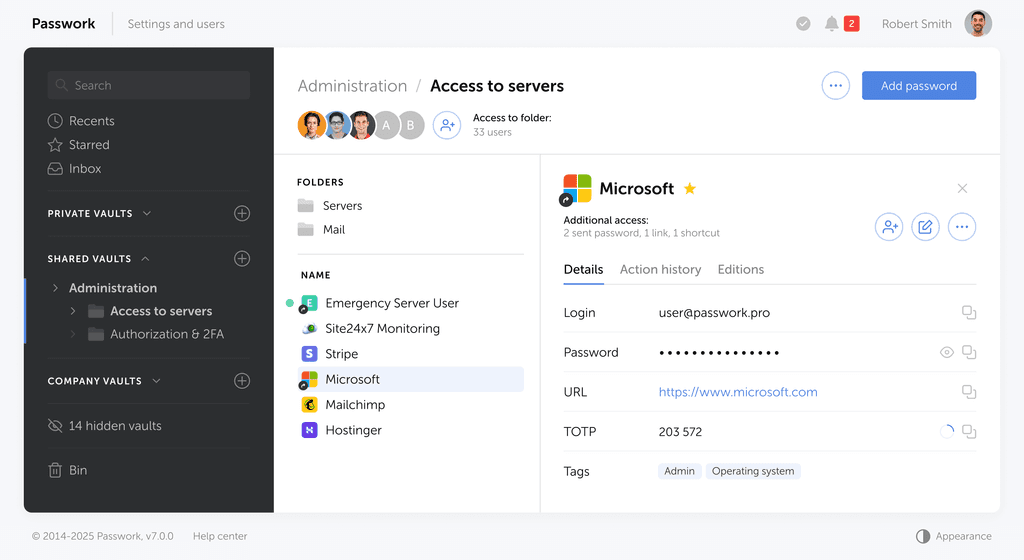
Self-hosted password manager for business
Passwork provides an advantage of effective teamwork with corporate passwords in a totally safe environment. Double encryption and zero-knowledge architecture ensure your passwords never leave your infrastructure.
Learn more